


VIN Check Report for Used Cars
4.54.46K Reviews
App Specs
- Version
- 12.1.1.0
- Updated On
- License
- Free
- Downloads
- 1,000,000+
- Developer
- VINDecoded.com
- Categories
- Auto & Vehicles
- Platform
- Android, iOS
Screenshots
 Analysis by AppCompare
When a used-car search becomes a household project, it helps to have one place to start checking a vehicle’s history. I’d use VIN Check Report for Used Cars as a screening tool: one person can enter a vehicle’s VIN while everyone compares the result with the seller’s claims, the paperwork and what they can see in person. That makes it useful before a family commits to a viewing, not just when someone is already standing beside the car.
The app comes from VINDecoded.com and sits in the auto and vehicle category. It is free to install, with in-app purchases ranging from $0.99 to $24.99 per item, so I would check the cost shown for a report before assuming every lookup is included. Its audience rating is Everyone, and it has been available since May 21, 2015. Those details make it easy to consider as a practical tool, but the value still depends on what information a particular report returns and how carefully you follow up.
Use one lookup to organize a shared decision
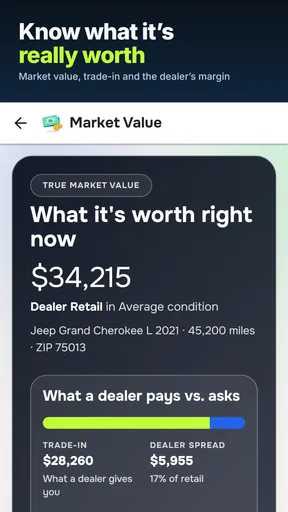
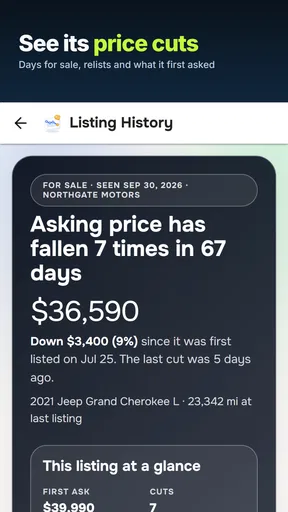
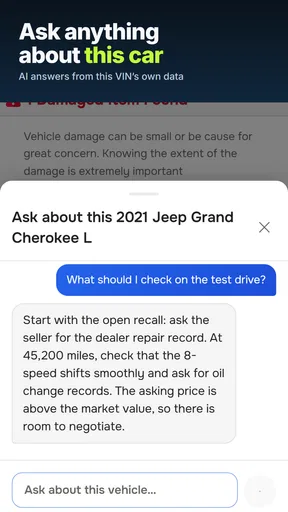
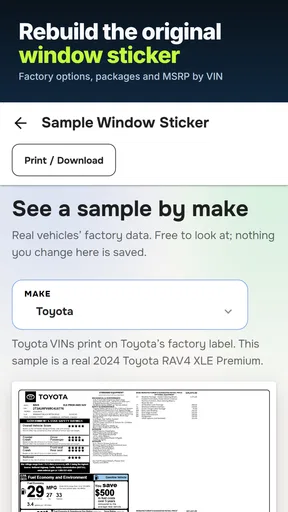
A realistic use is a couple or household comparing two cars for the same commute. One person can collect the VINs from the listings, then the group can review any available history, specifications, value details, recall information, engine data, or stolen-vehicle flags. Rather than forwarding a vague “looks fine” message, the person doing the search can share the specific concern that needs checking: perhaps a mismatch with the seller’s description or a recall status worth asking about.
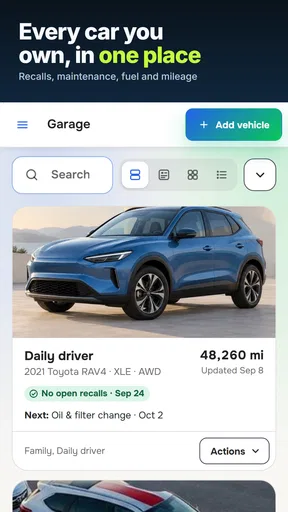
That workflow is more useful than treating a report as a verdict. I’d keep a short note for each candidate with the VIN, the seller’s stated mileage, the asking price, and questions raised by the report. If a detail looks inconsistent, ask the seller to explain it and compare it with the vehicle documents. This makes it easier for another household member to pick up the conversation without repeating the whole search, even though the app should not be mistaken for a shared family account or a system for managing other people’s access.
Set sensible boundaries before entering details
For a shared phone or tablet, I’d agree on who is responsible for running and interpreting a lookup. A VIN is vehicle-identifying information, so use the number for the car you are actually evaluating and avoid putting unrelated personal details into notes or messages. If the device is shared, remember that anything saved locally or visible in the app may be seen by the next person using it; I would not assume separate profiles or household privacy controls.
There is also a practical spending boundary. Although downloading the app is free, individual in-app items can cost money. Before running multiple checks for every listing that catches your eye, narrow the shortlist first: confirm the car is still available, make sure the VIN is readable, and decide which candidates justify a paid report. That small bit of coordination can prevent duplicated lookups and keeps the tool’s cost from creeping into an early, unfocused search.
Coordinate findings with the right people
A vehicle history result is most helpful when it leads to a concrete next step. If one person spots a recall entry, another can ask the seller for service documentation or contact an appropriate dealership to discuss it. If the report surfaces a stolen-vehicle concern or a title issue, pause the purchase process and verify the situation through suitable official channels rather than relying on a quick conversation or a screenshot alone.
Worth Reading Before You Choose

EA SPORTS FC Mobile 26 Is a Bigger Football Game, but It Takes Time

Flipboard Shows What News Apps Must Do Beyond the Feed

Switching to Android Auto Means Rethinking Your Driving Routine

Google Calendar Makes a Crowded Week Easier to Manage

Ludo King Makes the Most of the Minutes Between Plans

Baby Panda World Brings Quick Play to Modern Phones, but Its Game Library Feels Busy
Reports can also be incomplete or difficult to interpret. A clean-looking result does not prove that a car has never been damaged, and a flagged item may need context. Records depend on what has been reported and captured, so I would pair the lookup with an independent mechanical inspection, a road test and a careful review of the title and maintenance paperwork. That combination is more dependable than expecting any phone app to reveal every hidden fault.
Age, trust and who should use it
The Everyone content rating makes the app broadly suitable for general audiences, but that is not the same as recommending that a child make a purchase decision. For a family buying a first car, I’d have an adult handle any paid lookup and explain the findings in plain language. A younger driver can help compare the seller’s description with the vehicle details, while an experienced adult checks the legal and mechanical questions that a history report cannot settle.
With an average rating of 4.5 from around 11,000 ratings, alongside roughly 4,400 written reviews and more than 1 million installs, the app has a substantial audience. I’d take that as a sign that many people find the basic lookup useful, not as a guarantee that every report will answer every question. It suits shoppers who want a quick starting point for VIN-related information; it is less suitable for anyone expecting a complete inspection, a formal valuation they can treat as definitive, or a substitute for professional advice.
Compared with searching for each detail separately, a VIN lookup can bring vehicle-related clues together in one place and save time when screening several candidates. The trade-off is that a report still needs interpretation, and some checks may involve an in-app purchase. If you only need to confirm one fact, such as a specification listed by the manufacturer, a direct source may be clearer. If you are about to spend serious money, use this app to prepare better questions, then verify important findings independently.
Have you ever been on the brink of buying a used car, but the fear of hidden issues held you back? Yeah, I’ve been there too! That’s where the VIN Check Report for Used Cars app comes into play. Let me walk you through my experience with this nifty little tool.
What’s the Deal with VIN Check?
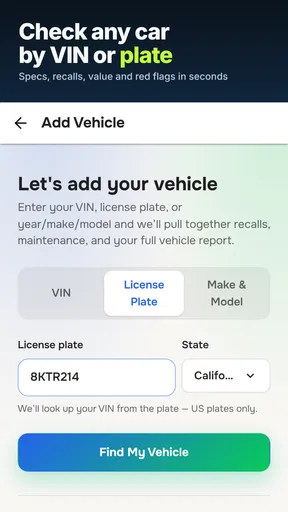
The VIN Check Report for Used Cars app is basically your new best friend when shopping for a used vehicle. It allows you to pull up detailed reports of a car's history using its Vehicle Identification Number (VIN). Just punch in the VIN, and voilà, you've got access to information that might otherwise take hours to gather manually.
Why Even Bother?
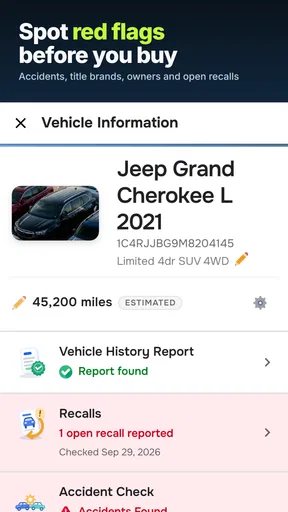
First off, understanding a car’s history is key. We're talking about accidents, repairs, and even whether it was stolen at some point. This app essentially helps you avoid any nasty surprises down the road. Plus, it’s super user-friendly. Even if you’re not tech-savvy, navigating through this app feels like a breeze.
All you need is the VIN, which is usually easy to find on the car’s dashboard or door frame. Once you enter it into the app, you get a comprehensive overview of the car’s past. This includes title issues, mileage discrepancies, and even details about past owners. It's like having a detective on your phone!
Features That Stand Out
So, what makes this app stand out from others? Well, here are a few features that caught my eye:
- Comprehensive Reports: The app provides detailed insights into the car’s history. It doesn’t just scratch the surface; it goes deep.
- Easy-to-Use Interface: The design is sleek and straightforward. You won’t find yourself lost or needing a manual to use it.
- Quick Results: Speed is of the essence, especially when you’re standing at a dealership. The app delivers reports in seconds.
- Data Accuracy: The reports are sourced from credible databases, ensuring you get accurate and reliable information.
Getting Down to Business
The app is available for both Android and iOS, which is a huge plus. Setting it up was a breeze. I downloaded it in a jiffy, and the installation process was smooth sailing. Once you open the app, you’re greeted with a clean interface and clear instructions on how to get started.
As someone who tends to overthink purchases, having all this information at my fingertips was incredibly reassuring. I tested it out with a couple of VINs from different cars I was considering, and the information matched up with what the dealers had told me. Talk about peace of mind!
Final Thoughts
In a world where buying a used car can sometimes feel like a gamble, the VIN Check Report for Used Cars app is a game-changer. It takes the guesswork out of the equation and arms you with all the information you need to make an informed decision. Whether you’re a first-time buyer or a seasoned car enthusiast, this app is definitely worth having in your arsenal.
Next time you’re eyeing that shiny pre-owned car, just remember: a quick VIN check could save you from a heap of trouble. Trust me, you’ll thank yourself later.
Pros
- Comprehensive vehicle history data.
- User-friendly interface for quick navigation.
- Includes accident and title checks.
- Easy VIN scanning feature.
- Affordable one-time report purchase.
Cons
- Limited free report details.
- Occasional data update delays.
- No offline access to reports.
- Additional fees for extra features.
- Reports may vary by vehicle model.
FAQs for VIN Check Report for Used Cars
What information does the VIN Check Report provide?
The VIN Check Report offers a comprehensive overview of a vehicle's history. This includes accident history, title status, mileage records, and any past recalls or repairs. It also checks for theft records, giving you a complete picture of the car's background before making a purchase decision.
How accurate is the VIN Check Report data?
The data provided in the VIN Check Report is sourced from reputable databases, including state DMVs, insurance companies, and auto manufacturers. While it strives for accuracy, it's essential to cross-reference the information with additional sources for the most reliable insight into a vehicle's history.
Is the VIN Check Report app user-friendly for beginners?
Yes, the VIN Check Report app is designed with user-friendliness in mind. Its intuitive interface allows users to easily input a vehicle's VIN and receive a detailed report. The app includes clear instructions and explanations, making it accessible even for those who are new to using vehicle history apps.
Can I use the VIN Check Report app on multiple devices?
The VIN Check Report app is available for both Android and iOS, allowing you to access it on multiple devices. Simply download the app on each device and log in with your account credentials to keep track of all your reports and vehicle history checks seamlessly across platforms.
Is there a cost associated with using the VIN Check Report app?
While the VIN Check Report app may offer some features for free, accessing detailed vehicle history reports typically incurs a fee. Prices can vary based on the depth of the report. Check the app for specific pricing details and any available subscription plans that could offer additional benefits.


